
Crypto Invoice Expiry 2026: The 15-Minute Window Problem
Crypto invoice expiry runs 15-20 minutes, but 24% of Bitcoin blocks took longer than that on 14 Sep 2026. Five gateway timers compared with live data.

Key Takeaways
- A quarter of Bitcoin blocks outlast the invoice. Across 164 consecutive block intervals timed on 13-14 September 2026, 40 (24.4%) ran longer than 15 minutes and the slowest single block took 49.88 minutes.
- The window is a rate-lock decision, not a blockchain one. Nobody picked 15 minutes by looking at block times — it is how long the gateway will hold an exchange-rate quote.
- The published windows differ by 192x. BitPay fixes it at 15 minutes; Cryptomus defaults to 3,600 seconds and allows up to 43,200; Plisio allows up to 48 hours. Only BitPay does not let you change it.
- There is a second clock, and it is the dangerous one. BitPay marks a paid invoice invalid if it has not confirmed within 1 hour. BTCPay's equivalent default is 1,440 minutes. At six confirmations, 36.5% of our measured windows exceeded an hour.
- Late money is not handled the same way twice. BTCPay has an explicit
Expired (paidLate)state that keeps the payment attached to the order. Most gateways do not.
Table of Contents
- Why a crypto invoice expiry window exists at all
- The five windows, side by side
- CoinGate runs two clocks, and yours probably does too
- We timed 164 Bitcoin blocks against a 15-minute window
- What happens to money that lands after the buzzer
- The second clock: expired is not the same as invalid
- Expiry and underpayment are the same bug in two hats
- Setting a crypto invoice expiry you can defend
- FAQ
Why a crypto invoice expiry window exists at all
A customer opens your checkout, sees a QR code and a countdown, goes to fetch their hardware wallet, and comes back to a dead page. You have lost the sale and gained a support email, and the reason sitting behind it has nothing to do with your store. Crypto invoice expiry is an exchange-rate decision that your gateway made on your behalf, and on most gateways it is set to 15 or 20 minutes. We read the published invoice documentation for five gateways for this piece and then timed 164 consecutive Bitcoin blocks against that window, because the interesting question is not what the timer says — it is whether the chain underneath it agrees.
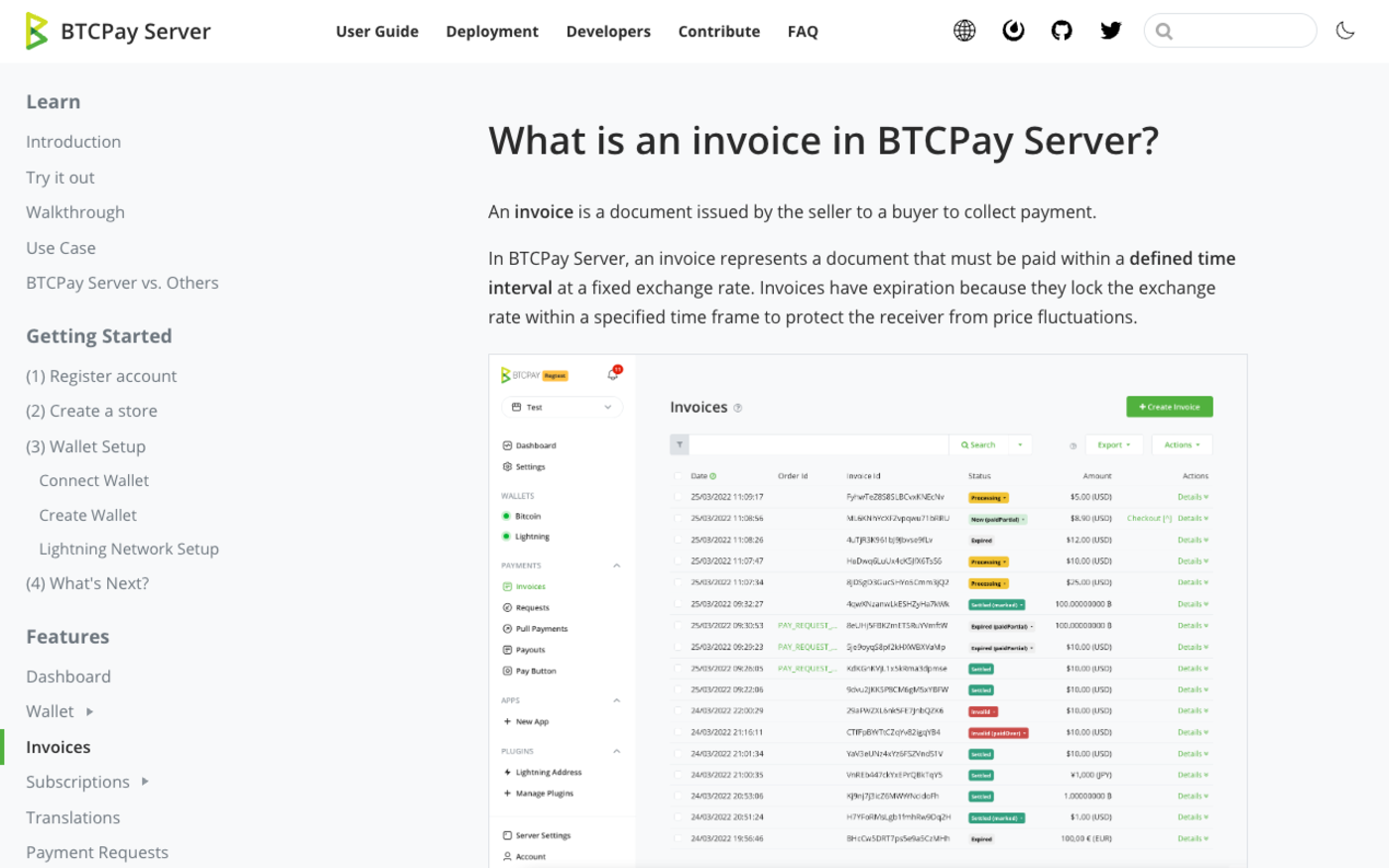
The mechanism is simple enough. When the gateway prints an invoice it converts your fiat price into a quantity of crypto and promises that quantity will settle the order. From that moment it is short the coin and long your price, and if the market moves before the payment lands, somebody eats the difference. BTCPay Server's own documentation states it without decoration: invoices have expiration because they "lock the exchange rate within a specified time frame to protect the receiver from price fluctuations."
The consequence nobody draws out
- The timer was never calibrated to a blockchain. It is a risk-appetite number, which is why the same 15 minutes appears on gateways whose fastest supported chain settles in under a second.
- It is priced against the most volatile asset you accept, not the one being paid. A USDC invoice carries almost no rate risk and still gets the same countdown as a BTC one.
- If you settle in the same asset the customer pays in, the risk is zero — and you are still running somebody else's timer.
That last point is worth holding on to. A merchant who takes USDT and keeps USDT has no exchange-rate exposure whatsoever, and the window they run exists purely because it was the default. The rest of this piece is about what that default costs — starting with the fact that the five gateways in front of us cannot agree on it within two orders of magnitude.
The five windows, side by side
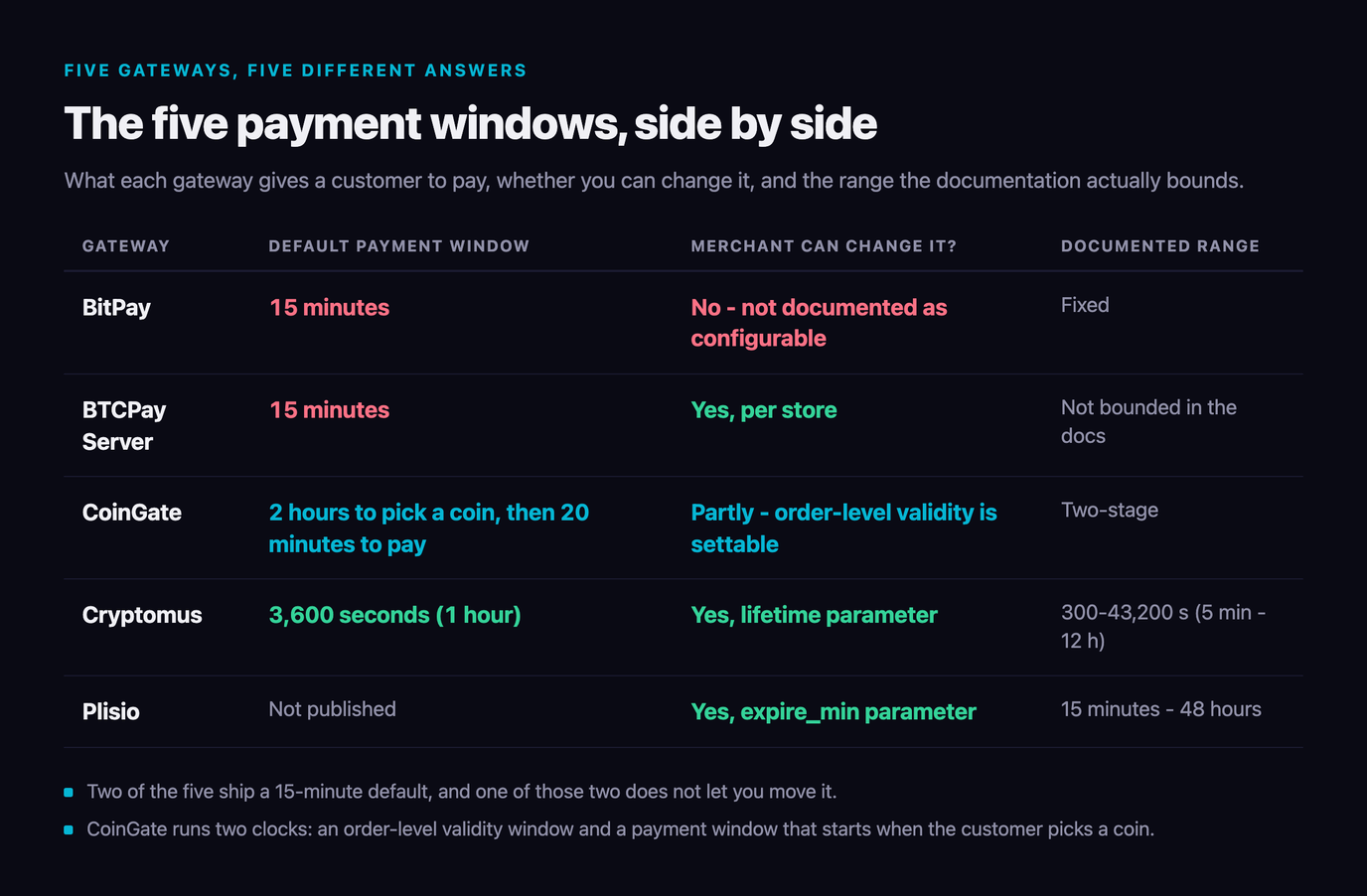
Here is what the documentation actually says, read on 14 September 2026. Every figure below is first-party — a developer reference or the provider's own blog — because the third-party guides on this topic repeat "15 minutes" as though it were a standard, and it is not.
| Gateway | Default payment window | Merchant can change it? | Documented range |
|---|---|---|---|
| BitPay | 15 minutes | No — not documented as configurable | Fixed |
| BTCPay Server | 15 minutes | Yes, per store | Not bounded in the docs |
| CoinGate | 2 hours to pick a coin, then 20 minutes to pay | Partly — order-level validity is settable | Two-stage; see below |
| Cryptomus | 3,600 seconds (1 hour) | Yes, lifetime parameter | 300-43,200 s (5 min - 12 h) |
| Plisio | Not published | Yes, expire_min parameter | 15 minutes - 48 hours |
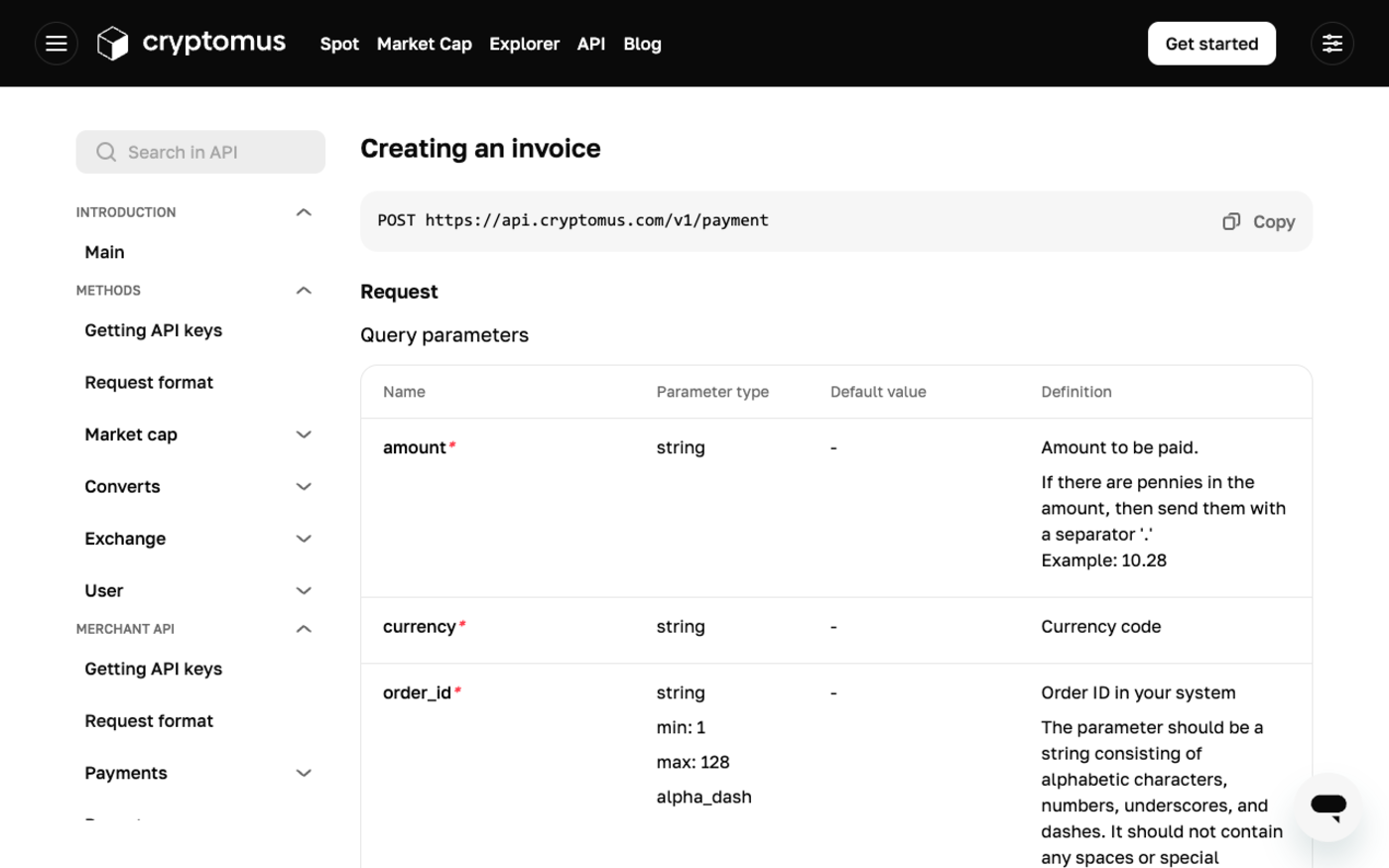
Two things jump out. The first is the spread: Cryptomus's default is four times BitPay's, and Plisio's ceiling is 192 times it. There is no industry standard here, only a number that got copied enough times to look like one. Cryptomus's API reference gives the lifetime parameter a default of 3600 with a minimum of 300 and a maximum of 43200 seconds, and Plisio's announcement of its own time-limit feature states that "the minimum value starts at 15 minutes, while the maximum value is up to 48 hours."
The second is that BitPay is the only one of the five with no documented way to change it, and it also has the shortest window. If your product needs a customer to move money from cold storage or an exchange withdrawal queue, that combination is a hard constraint on your checkout, not a setting. It is the same pattern we found when we looked at how quickly gateways actually pay merchants: the ones that publish the most detail are also the ones that let you change the most.
CoinGate runs two clocks, and yours probably does too
CoinGate is the only gateway of the five that documents something most of the others almost certainly do without saying so: the countdown the customer sees is not the countdown that started when the invoice was created. Its order-status reference splits the lifecycle in two.
An order in new — created, but the shopper has not yet chosen which coin and which network to pay with — is given 2 hours. The moment they choose, the order moves to pending, the gateway prints an address and a fixed quantity, and a 20-minute clock starts. Miss either and the order lands in expired.
Why the split matters for your integration
- The rate is only quoted at stage two. Nothing is at risk while the shopper browses coins, so that stage can be generous. The expensive stage is short by necessity.
- Your "invoice valid for N minutes" email is wrong. If you send a payment link and quote the total window, a customer who opens it an hour later has 20 minutes, not two hours.
- A gateway with a single published number is hiding one of these two. The rate quote has to start somewhere, and it is not at invoice creation unless the coin was pre-selected.
This is the detail that turns an invoice-expiry policy from a number into a design. If you email payment links for B2B invoices, the window that matters is the one before coin selection, and it wants to be hours or days. If the customer is already holding their phone at a checkout, the second window is the one that matters and 20 minutes is generous. Quoting one number for both is how merchants promise something the gateway never agreed to.
Expiry hurts least when you are not carrying the rate
A window is short because somebody is underwriting a price. NOWPayments forwards each payment straight to your own wallet and supports 300+ assets, so a merchant settling in the same coin the customer sends is not paying for a rate lock they never needed. 0.5% on payments, no KYC to start.
Get a NOWPayments API Key →We timed 164 Bitcoin blocks against a 15-minute window
Every guide on this topic repeats that a Bitcoin block takes ten minutes. That is the average, and the average is the least useful number in the distribution. Block intervals are exponentially distributed, which means the mean sits well above the median and there is a long tail that a countdown timer runs straight into.
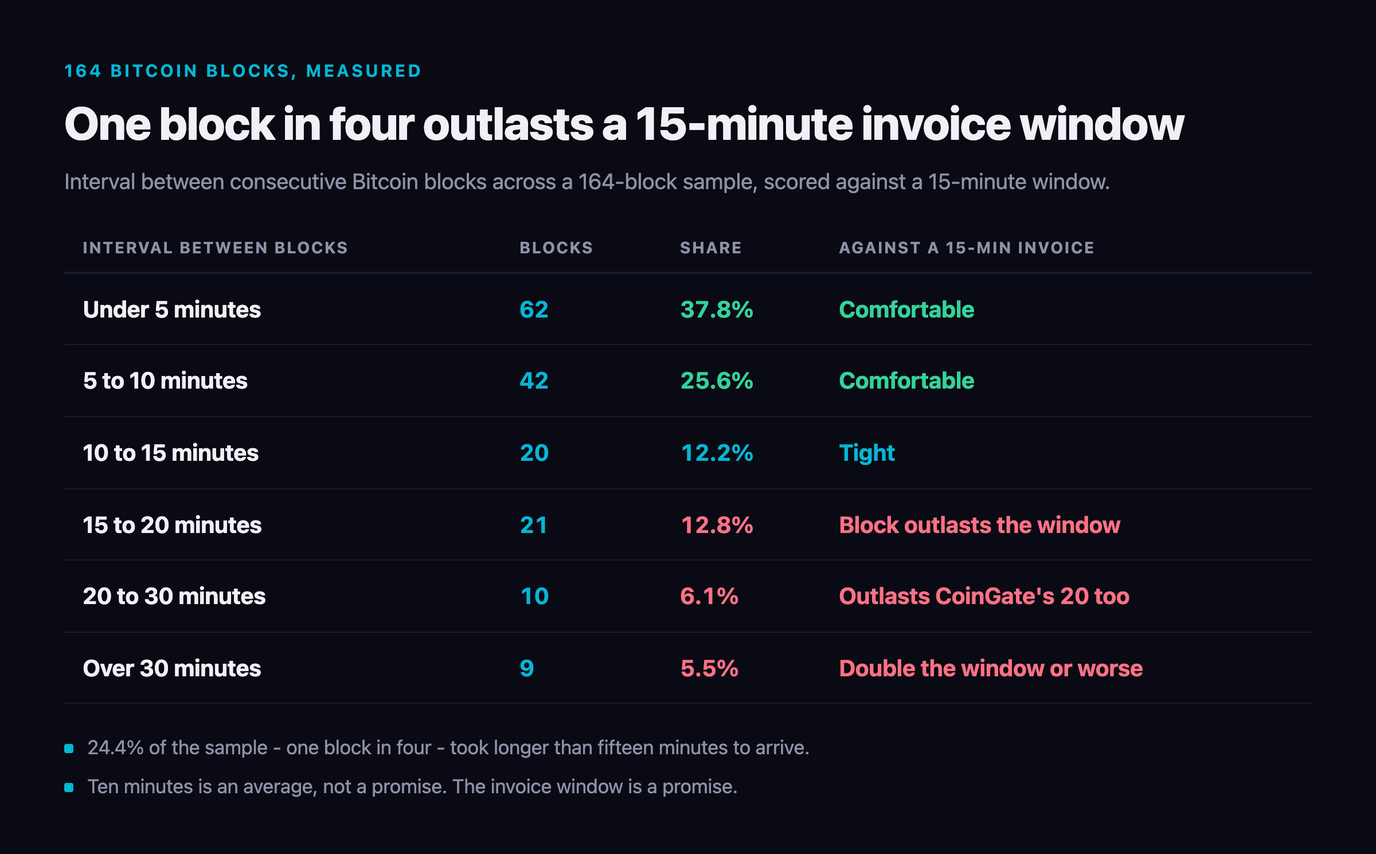
So we measured it. Using mempool.space's block API we pulled 165 consecutive Bitcoin blocks, heights 966,812 to 966,976, covering 13 September 2026 11:25 UTC to 14 September 2026 14:18 UTC, and measured the 164 intervals between them. The mean was 9.83 minutes and the median 7.20 — already a two-and-a-half-minute gap that tells you the shape of the thing.
| Interval between blocks | Blocks | Share | Against a 15-min invoice |
|---|---|---|---|
| Under 5 minutes | 62 | 37.8% | Comfortable |
| 5 to 10 minutes | 42 | 25.6% | Comfortable |
| 10 to 15 minutes | 20 | 12.2% | Tight |
| 15 to 20 minutes | 21 | 12.8% | Block outlasts the window |
| 20 to 30 minutes | 10 | 6.1% | Outlasts CoinGate's 20 too |
| Over 30 minutes | 9 | 5.5% | Double the window or worse |
Forty of 164 intervals — 24.4% — ran longer than 15 minutes. Nineteen ran longer than 20. The slowest single block took 49.88 minutes, and there were nine over half an hour in a single ordinary day. This is not a congestion story: the mempool was empty enough that fastestFee and economyFee both read low, so these are not blocks that were hard to get into. They are just blocks that took a while to be found, which is what a Poisson process does.
A note on method. Seven of the 164 intervals came out negative — not a measurement error, but a consequence of Bitcoin block timestamps being miner-set and only loosely ordered, so a block can legitimately carry an earlier timestamp than its parent. We folded those into the "under 5 minutes" bucket, which understates the slow tail rather than inflating it.
The practical reading: a customer who broadcasts in the last minute of a 15-minute window has roughly a one-in-four chance that the very next block alone outlasts the invoice. Whether that costs them the order depends entirely on the next section, which is the part of the documentation nobody reads until it has already happened. Our guide to crypto payments that never arrive covers the neighbouring failure modes; this one is specifically about the clock.
What happens to money that lands after the buzzer
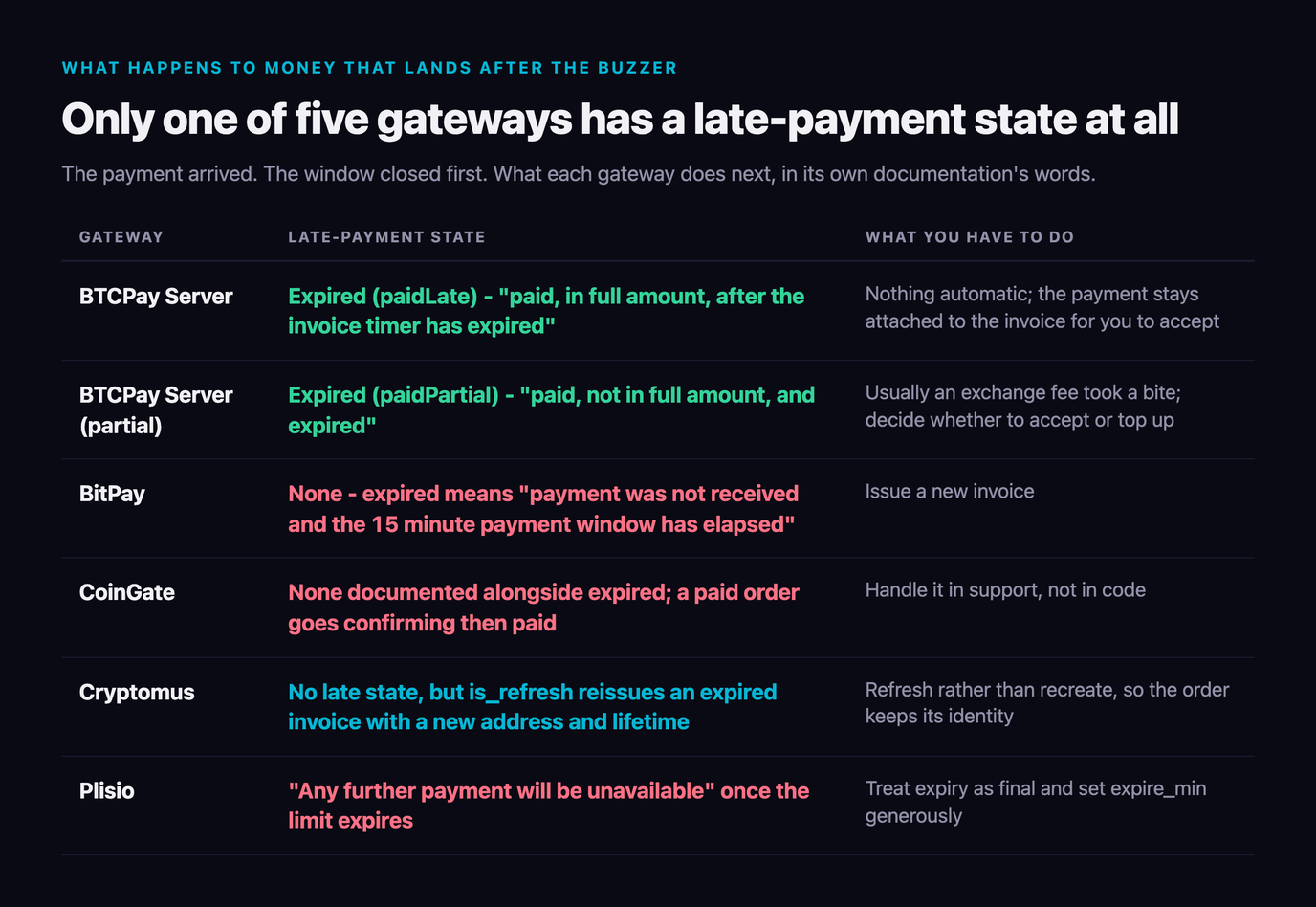
Here is the question that decides whether an expired invoice is an inconvenience or a lost customer: the coins were broadcast in time and confirmed late — does your gateway still know which order they belong to? The five gateways answer this very differently, and only one of them has a name for the situation.
| Gateway | Late-payment state | What you have to do |
|---|---|---|
| BTCPay Server | Expired (paidLate) — "paid, in full amount, after the invoice timer has expired" | Nothing automatic; the payment stays attached to the invoice for you to accept |
| BTCPay Server (partial) | Expired (paidPartial) — "paid, not in full amount, and expired" | Usually an exchange fee took a bite; decide whether to accept or top up |
| BitPay | None — expired means "payment was not received and the 15 minute payment window has elapsed" | Issue a new invoice |
| CoinGate | None documented alongside expired; a paid order goes confirming then paid | Handle it in support, not in code |
| Cryptomus | No late state, but is_refresh reissues an expired invoice with a new address and lifetime | Refresh rather than recreate, so the order keeps its identity |
| Plisio | "Any further payment will be unavailable" once the limit expires | Treat expiry as final and set expire_min generously |
BTCPay's design is the one to copy, and it is not an accident that the self-hosted option is the one that models reality most honestly. Coins that arrive after a deadline are still coins; pretending otherwise does not make them go away, it just detaches them from the order they were meant to settle. Cryptomus gets to a similar place by a different route — is_refresh updates "the address, payment status and expiration time" on an existing invoice without changing anything else, so the order identity survives the expiry.
Everywhere else, late money is a reconciliation job: you find it in the wallet and match it to a customer by amount and timing, by hand. Price that before choosing a gateway on fee percentage alone — our fee comparison cannot capture the cost of an hour in a spreadsheet.
The second clock: expired is not the same as invalid
There is a second timer in every one of these systems and almost nobody writes about it. Expired means nobody paid. Invalid means somebody paid and the transaction did not confirm deeply enough, fast enough. The two failure modes look identical to the customer and are completely different to fix.
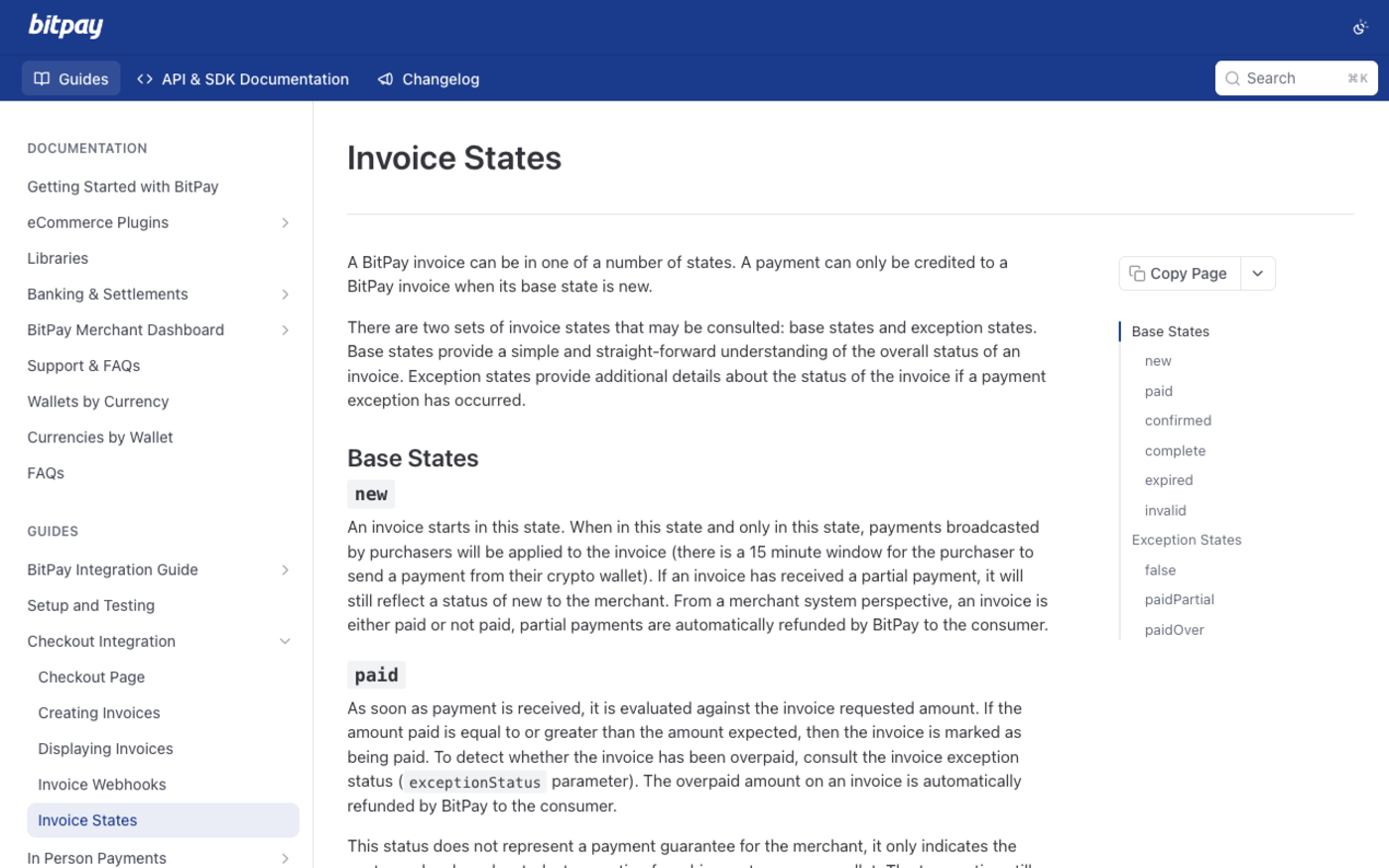
BitPay's invoice-states reference is precise about it: "An invoice is considered invalid when it was paid, but the corresponding cryptocurrency transaction was not confirmed within 1 hour on the corresponding blockchain." BTCPay has the same concept with a vastly more forgiving default — its store setting for "payment invalid if transactions fails to confirm" is documented at 1,440 minutes, a full day after expiry.
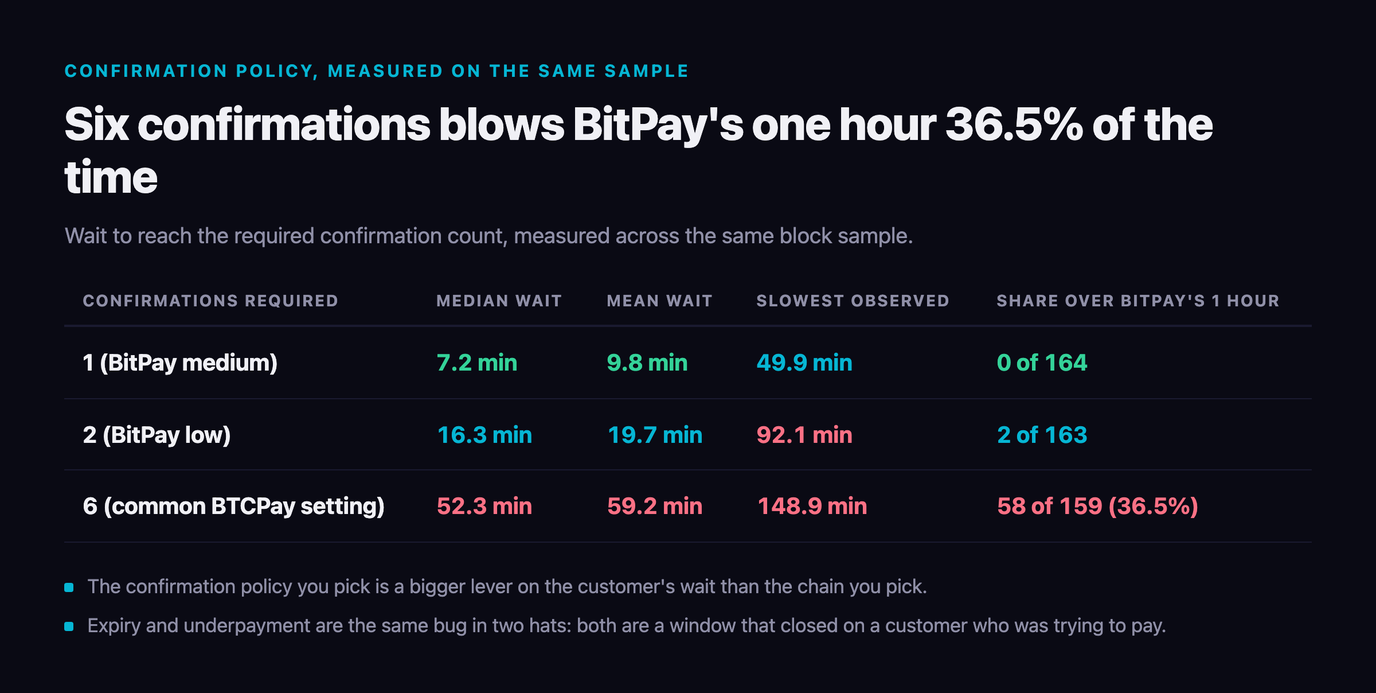
Whether an hour is enough depends on how many confirmations you demand, and here our measured data is unambiguous. We ran the same 165-block sample as rolling confirmation windows:
| Confirmations required | Median wait | Mean wait | Slowest observed | Share over BitPay's 1 hour |
|---|---|---|---|---|
1 (BitPay medium) | 7.2 min | 9.8 min | 49.9 min | 0 of 164 |
2 (BitPay low) | 16.3 min | 19.7 min | 92.1 min | 2 of 163 |
| 6 (common BTCPay setting) | 52.3 min | 59.2 min | 148.9 min | 58 of 159 (36.5%) |
At one confirmation, BitPay's hour is never breached in our sample — the slowest single block was 49.9 minutes and nothing came close to 60. At two, it is breached twice. At six confirmations, more than a third of the windows we measured ran past an hour, and the slowest took nearly two and a half. A merchant who pairs a six-confirmation policy with a one-hour invalid threshold has built a machine that marks correctly-paid invoices invalid about a third of the time.
BitPay's own transactionSpeed settings make the safe combination explicit: high confirms on receipt, medium at one confirmation, which it describes as taking "on average 10 minutes" on Bitcoin, and low at two, "about 20 minutes on average". Both of those sit comfortably inside the hour. Six does not, and six is not a BitPay setting — it is the number merchants pick from folklore when a platform lets them. The choice of rail changes this picture entirely, which we worked through in which chain to accept in 2026.
Expiry and underpayment are the same bug in two hats
The single most common expired-invoice support ticket is not actually about time. It is about a customer paying from an exchange, the exchange deducting its withdrawal fee from the amount sent, and the invoice sitting unsatisfied at 99.4% paid until the clock kills it. BTCPay names this case in its documentation of Expired (paidPartial), noting it typically happens when "a buyer pays the invoice from the exchange wallet which takes a fee."
The fix is a tolerance, not a longer timer. CoinGate's guidance on accepting underpaid orders automatically suggests a "Max % of Order Amount to Cover" setting and recommends "a smaller amount, such as 1-2%", on the basis that it "will most likely cover over 90% of orders that are accidentally underpaid". BTCPay exposes the same idea as "consider the invoice paid even if the paid amount is ...% less than expected".
Set these three together or none of them works
- Payment tolerance 1-2%. Absorbs the exchange withdrawal fee that causes most partial payments.
- A window that clears the chain's slow tail. On Bitcoin that means 30 minutes or more, per the measurements above.
- A confirmation count your invalid threshold can actually reach. One or two on Bitcoin if your invalid clock is an hour.
Tune one and you move the failure somewhere else. A generous tolerance with a 15-minute window still expires on a slow block; a 60-minute window with a six-confirmation policy and an hour-long invalid clock still throws the payment away at the last step. They are one setting wearing three names.
Setting a crypto invoice expiry you can defend
The question to answer first is not "how long" but "who is carrying the rate?" If the gateway converts at the quoted rate and pays you fiat, every extra minute is exposure someone is underwriting and a short window is correct. If you settle in the same asset the customer pays in, you carry nothing and a short window is pure abandonment risk with no offsetting benefit.
| Your setup | Suggested window | Why |
|---|---|---|
| Stablecoin in, stablecoin out | 2-24 hours | No rate risk to hedge; the only reason to expire at all is address hygiene |
| BTC in, fiat settlement | 30-60 minutes | Clears the 24.4% of blocks over 15 min without quoting a stale rate all day |
| Emailed B2B invoice | Days on stage one, minutes on stage two | The recipient is not at their desk; the rate only needs locking once they are |
| In-person or point of sale | 15 minutes is fine | Customer is present with a funded wallet; offer Lightning and it is seconds |
| Digital goods, instant delivery | 30 minutes, 1 confirmation | You carry double-spend risk, so wait one block — but only one, or the invalid clock bites |
Then fix the problem at the rail rather than the timer. Every number in this article is a Bitcoin base-layer problem. Lightning payments settle in seconds and BTCPay Server treats them as settled on arrival "as their confirmation is instant", and the fast chains behave the same way. If expired invoices are generating tickets, adding a rail your customers can pay on in three seconds removes more of them than doubling the countdown ever will — our Lightning guide for merchants covers what that costs to run.
And write the window into your checkout copy honestly. "Pay within 15 minutes" is a promise about your gateway, not about the chain, and the chain is the thing that will break it. Telling a customer that a slow block can outlast the invoice and that you will honour a late payment anyway takes one sentence, and it is the sentence that stops the support email before it is written.
Pick a gateway whose clock you can see
Half the expiry problems in this article come down to a timer you cannot read or change. Compare what each gateway publishes about invoice lifetime, confirmations and settlement before you integrate — we track fees, KYC and plugin support for every processor in the directory.
Compare Crypto Payment Gateways →FAQ
Why do crypto invoices expire after 15 minutes?
Because the gateway has quoted a fixed amount of crypto for a fiat price and carries the exchange-rate risk until the payment lands. The timer is how long it will hold that quote. BTCPay Server's documentation says invoices have expiration because they "lock the exchange rate within a specified time frame to protect the receiver from price fluctuations." Fifteen minutes is a rate-risk decision, not a blockchain one — which is why the same number appears on gateways whose fastest chain settles in under a second.
How long is a crypto invoice valid on each gateway?
It varies more than most merchants expect. BitPay documents a 15-minute payment window. BTCPay Server ships a 15-minute default that the merchant can change. CoinGate runs two clocks — 2 hours before the shopper picks a coin, then 20 minutes to pay. Cryptomus defaults to a lifetime of 3,600 seconds, adjustable between 300 and 43,200. Plisio publishes no default but allows anything from 15 minutes to 48 hours.
Can a Bitcoin block take longer than the invoice window?
Routinely. We timed 164 consecutive Bitcoin block intervals between 13 September 2026 11:25 UTC and 14 September 2026 14:18 UTC. The mean was 9.83 minutes and the median 7.20, but 40 of them — 24.4% — ran longer than 15 minutes, 19 ran longer than 20, and the slowest single block took 49.88 minutes. A customer paying in the last minute of a 15-minute window has roughly a one-in-four chance that the next block alone outlasts the invoice.
What happens if a customer pays after the invoice expires?
It depends on the gateway, and it is the most important thing to check before integrating. BTCPay Server has a dedicated Expired (paidLate) state — "paid, in full amount, after the invoice timer has expired" — so the money stays attached to the order. BitPay treats expiry as final and needs a new invoice. CoinGate documents no late state beside expired. Cryptomus has no late state but its is_refresh flag reissues an expired invoice with a new address and lifetime, preserving the order.
What is the difference between an expired and an invalid crypto invoice?
Expired means nobody paid before the timer ran out. Invalid means somebody paid but the transaction failed to confirm deeply enough inside a second, longer window. BitPay marks an invoice invalid when "it was paid, but the corresponding cryptocurrency transaction was not confirmed within 1 hour on the corresponding blockchain." BTCPay's equivalent setting defaults to 1,440 minutes — a full day after expiry.
How many confirmations can I require without hitting the invalid threshold?
One or two on Bitcoin if your invalid clock is an hour. In our 165-block sample, one confirmation never took more than 49.9 minutes and never breached the hour; two confirmations breached it twice in 163 windows. Six confirmations took a median of 52.3 minutes, a mean of 59.2, a maximum of 148.9, and ran past an hour in 58 of 159 windows — 36.5%. Pairing a six-confirmation policy with a one-hour invalid threshold invalidates correctly-paid invoices about a third of the time.
Should I extend my crypto invoice expiry time?
Extend it if you settle in the same asset the customer pays in, because you carry no rate risk and a long window costs you nothing. Keep it short if the gateway converts to fiat at the quoted rate, because every extra minute is exposure you are underwriting for free. Thirty to sixty minutes is the useful middle for most merchants: it clears the slow tail of Bitcoin block times while keeping the quote inside a period a stablecoin-denominated business can absorb.
Does invoice expiry matter for Lightning or stablecoin payments?
Far less, and that is an argument for offering them. The 15-minute window is a problem specifically because Bitcoin's base layer produces blocks on an exponential distribution with a long tail. Lightning settles in seconds and BTCPay Server treats those payments as settled immediately "as their confirmation is instant". Fast-block chains behave the same way. If expiry is generating support tickets, adding a fast rail fixes more of them than lengthening the timer.
Affiliate disclosure: payyd.co earns a commission on sign-ups made through our /go/ links, including the NOWPayments link in this article. We have no affiliate relationship with BitPay, BTCPay Server or Cryptomus and include them because they publish the most detailed invoice-timing documentation of any gateway we checked. Every window, default and range above was read from the provider's own developer reference or blog on 14 September 2026 and dated accordingly; gateways change defaults without announcements, so confirm yours in your own dashboard before relying on a number here. The Bitcoin block timings are our own measurement of heights 966,812-966,976 via the mempool.space API, not a vendor figure — a single day is a small sample of a random process, and your own day will differ.