Crypto Payment Not Received? 7 Fixes for Merchants 2026
Your customer paid but the invoice says unpaid. The 7 real causes of a crypto payment not received — underpayment, wrong network, expiry — and each fix.
Key Takeaways
- Underpayment is the single most common reason a crypto payment is not received. The customer's wallet deducts the network fee from the send amount instead of adding it on top, so the invoice lands short by a dollar or two and stops. Plisio will not let you manually complete a payment below 95% of the total; NOWPayments parks it at
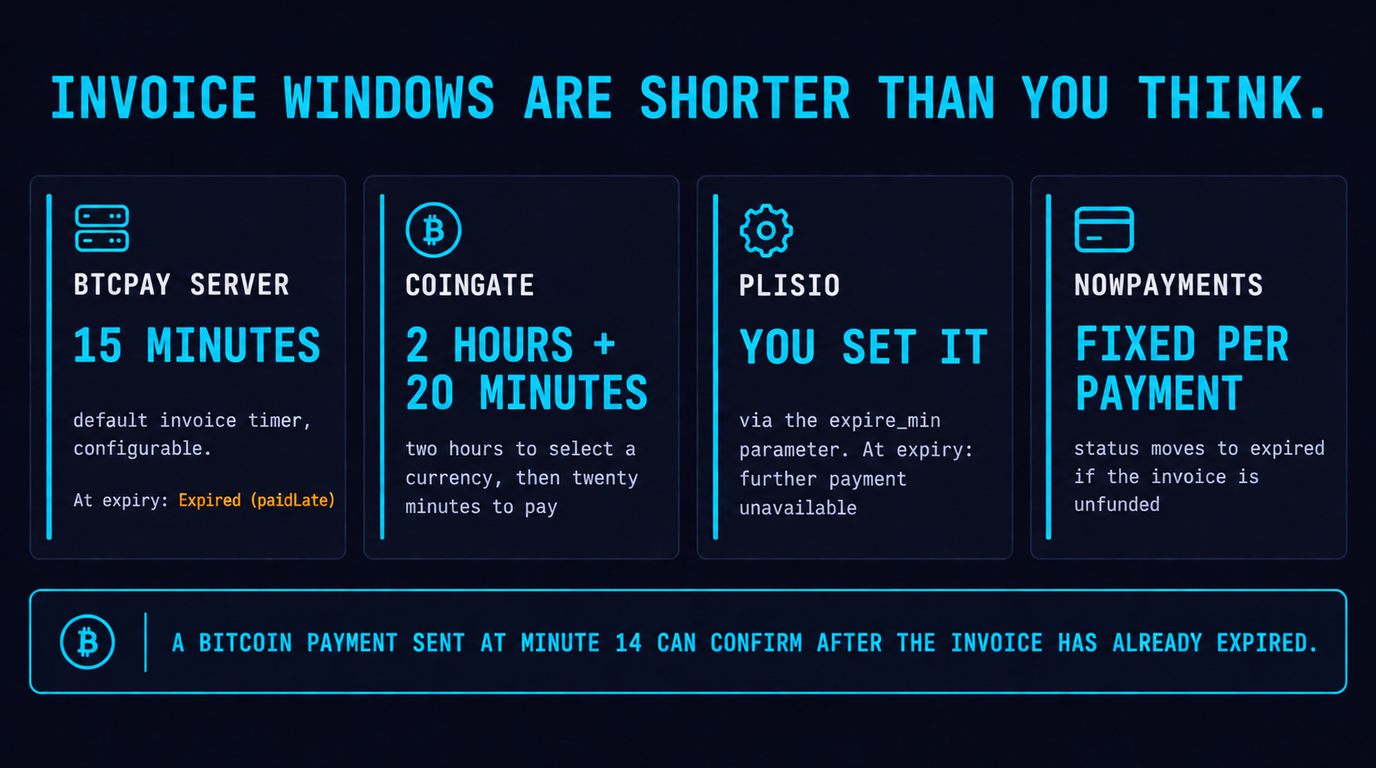
partially_paidand tells you not to deliver. - Invoice windows are shorter than merchants think. BTCPay Server defaults to a 15-minute invoice timer. CoinGate gives 2 hours to choose a currency but only 20 minutes to send once chosen. A Bitcoin payment sent at minute 14 can confirm after the invoice has already expired.
- Wrong-network sends are a key-custody question, not a support question. If the gateway controls the same address on the destination chain it can often sweep the funds; if it does not, nothing recovers them. Verify before you promise anything.
- If the chain says confirmed and your store does not, it is your webhook. NOWPayments requires a publicly reachable callback that returns 200 OK immediately and an HMAC SHA-256 signature check — three of the four failure modes here are on the merchant's side.
- Received is not settled. Payment finished, balance credited, and payout landed are three different events. Reconcile against payout records or you will chase money that was never late.
Table of Contents
- Why a paid invoice still shows unpaid
- Fix 1: the underpayment gap, and the 95% rule
- Fix 2: wrong network — the USDT trap
- Fix 3: the invoice expired before the block landed
- Fix 4: it is still confirming, and that is correct
- Fix 5: the chain paid you, your webhook did not
- Fix 6: overpayment, dust, and the network fee nobody mentioned
- Fix 7: "received" is not "settled"
- The 10-minute triage script
- FAQ
Why a paid invoice still shows unpaid
A customer emails you a screenshot of a completed wallet transaction and your dashboard insists nothing arrived. That is the worst ticket in crypto commerce, because on card rails the processor owns the whole story and here the story is split across four systems that do not talk to each other. It is also the ticket that costs you the sale twice: once in the refund and once in the review. When a crypto payment is not received, the cause is almost never fraud and almost never a broken blockchain — we went through the published status models and store settings of NOWPayments, Plisio, CoinGate and BTCPay Server to map every documented way a real payment fails to close an order.
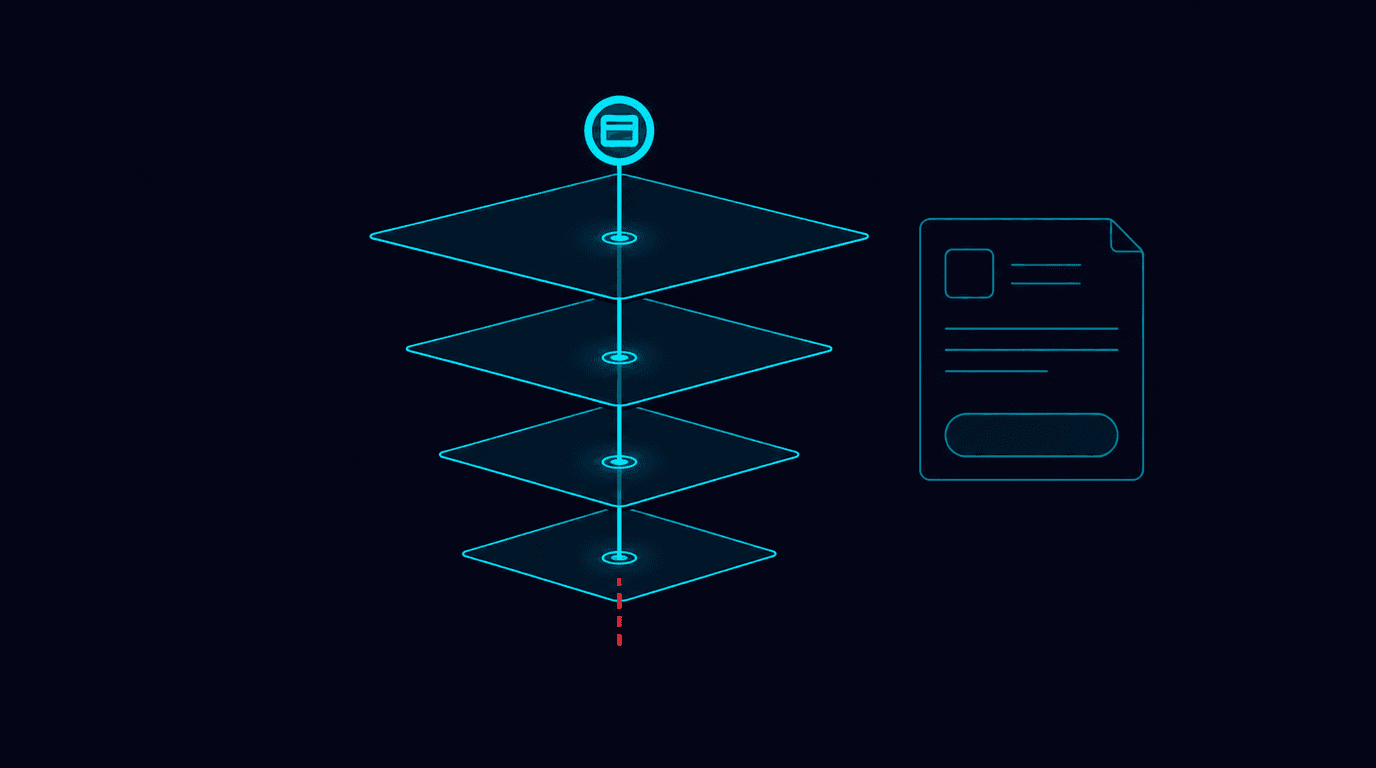
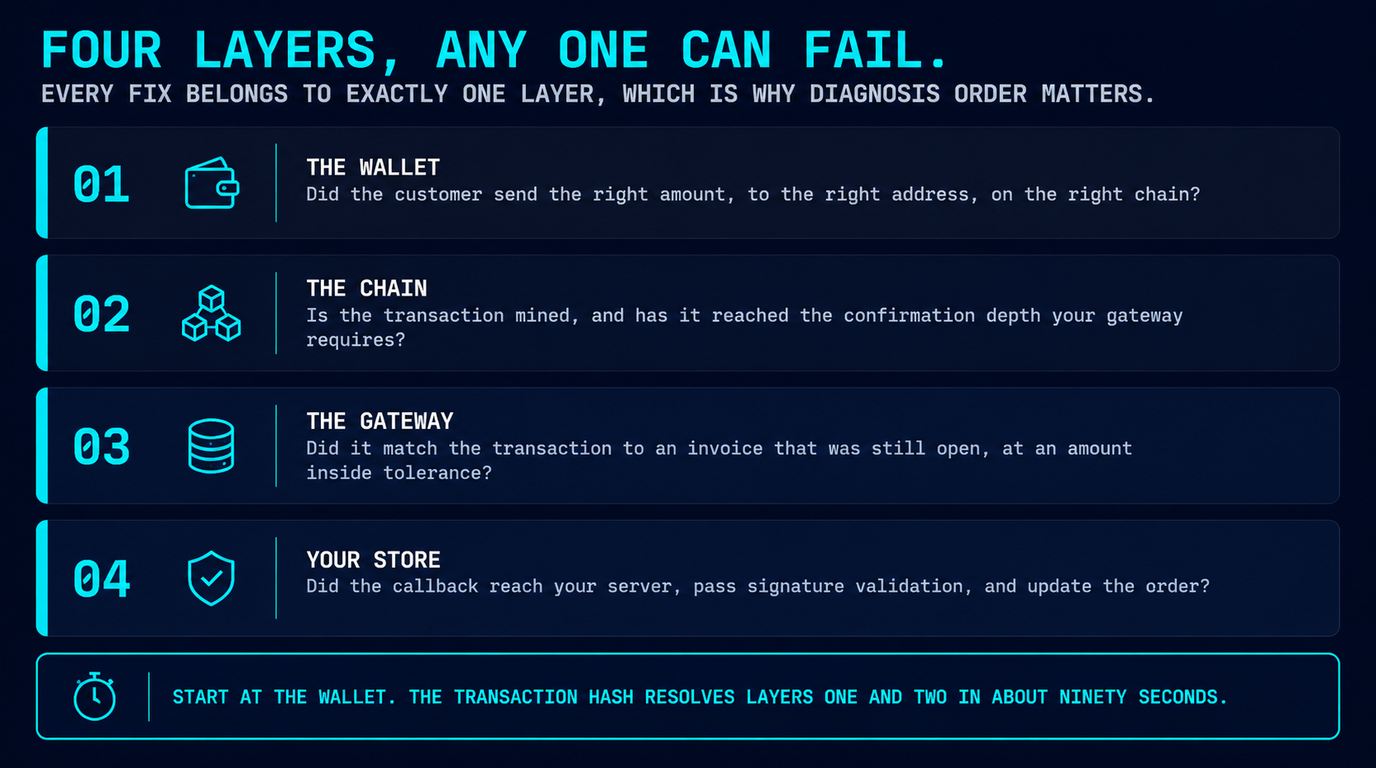
The useful mental model is four layers, each of which can pass while the next one fails:
- The wallet. Did the customer send the right amount, to the right address, on the right chain?
- The chain. Is the transaction mined, and has it reached the confirmation depth your gateway requires?
- The gateway. Did it match the transaction to an invoice that was still open, and at an amount inside tolerance?
- Your store. Did the callback reach your server, pass signature validation, and update the order?
Every fix below belongs to exactly one of those layers, which is why the diagnosis order matters more than the fixes themselves. Start at the wallet and work down — the transaction hash resolves layers one and two in about ninety seconds.
Fix 1: the underpayment gap, and the 95% rule
This is the one you will hit most. The customer opens an invoice for 50.00 USDT, taps their wallet's "max" or "send" button, and the wallet quietly subtracts the network fee from the amount rather than adding it on top. You receive 49.20 USDT against a 50.00 invoice. The chain is happy, the customer is happy, the invoice is stuck.
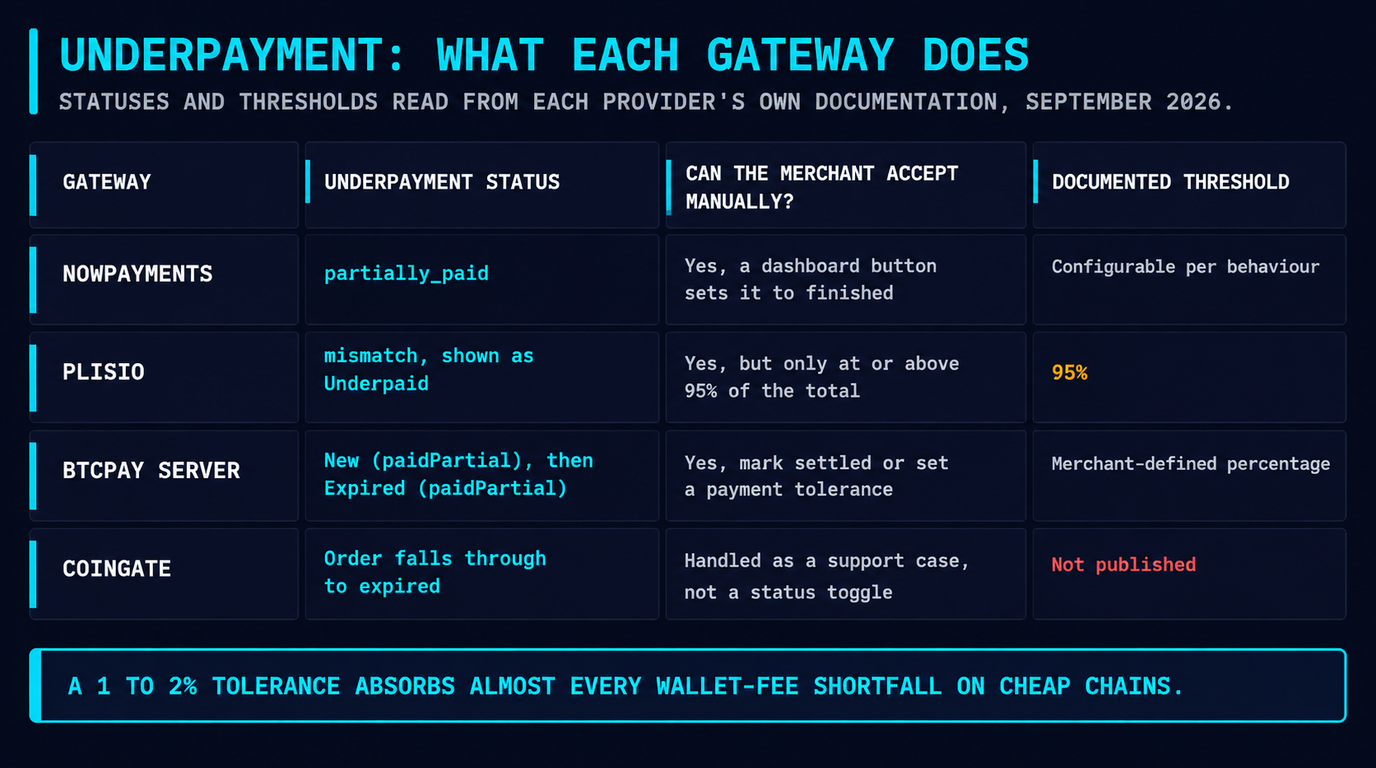
Gateways handle this through a tolerance setting, and the defaults are not generous. Plisio documents that you can set an acceptable underpayment rate in store settings, but that if the payment is less than 95% of the total amount, the option to manually complete the transaction will not be available — the transaction is instead credited to the store with an "Underpaid" status once the customer's payment window expires. Above that threshold you can open the operation details and click "Complete operation" yourself.
NOWPayments takes a different route: it exposes partially_paid as a first-class status, described in its documentation as a completed payment where the amount sent was less than the settled price, with the explicit instruction not to deliver because the customer sent less than required. The dashboard gives you a button to move that payment to finished if you decide the shortfall is acceptable. Its integration guidance also suggests routing repeated payments and wrong-asset deposits to partially_paid for ecommerce, and to finished for balance top-ups where any amount is legitimately acceptable.
| Gateway | Underpayment status | Merchant can accept manually? | Documented threshold |
|---|---|---|---|
| NOWPayments [Gold] | partially_paid |
Yes — dashboard button sets status to finished |
Configurable per behaviour (repeat / wrong-asset routing) |
| Plisio [Silver] | mismatch / "Underpaid" |
Yes, but only at or above 95% of the total | 95% — below this, manual completion is unavailable |
| BTCPay Server [Bronze] | New (paidPartial), then Expired (paidPartial) |
Yes — mark invoice settled, or set a payment tolerance % | Merchant-defined percentage rate in store settings |
| CoinGate [Bronze] | Order falls through to expired when unpaid in window |
Handled as a support/refund case, not a status toggle | Not published in the order-status reference |
Statuses and thresholds read from each provider's own documentation, checked September 2026. Tiering is payyd's editorial ranking, not a vendor claim.
The prevention that actually works: stop relying on the customer to get the arithmetic right. Put a line directly above the payment amount that says the network fee must be paid on top, not deducted, and set a tolerance you can live with — 1-2% absorbs almost every wallet-fee shortfall on cheap chains without opening you to abuse. If most of your volume is stablecoin, steering customers to a low-fee network shrinks the gap to cents; our guide to accepting USDT payments covers which chain to default to.
Fix 2: wrong network — the USDT trap
USDT exists on Ethereum, Tron, Solana, BNB Chain, Polygon and more. They are different tokens on different ledgers that happen to share a ticker, and a customer who picks the wrong one in their exchange's withdrawal dropdown has sent real money to a place your gateway is not watching.
Whether it comes back is a custody question with three honest answers:
- Same address, different EVM chain — often recoverable. An
0xaddress is derived from a private key that is valid on every EVM chain. If your gateway holds that key and supports the destination chain, sweeping the funds is a manual operation its support team can perform. - Different address format — usually not. A Tron
Taddress and a Bitcoinbc1address come from different key derivations. Funds sent to an address the gateway never generated on that chain are not sitting under a key it controls. - Non-custodial setups — it is on you. With a self-hosted BTCPay Server the key is yours, which means recovery is possible if the address is in your wallet's derivation path, and impossible if it is not. Nobody else can fix it.
NOWPayments' guidance treats wrong-asset deposits as a routing decision rather than an error, letting merchants push them to partially_paid so the payment lands somewhere visible instead of vanishing from the order flow. That is the right instinct generally: a wrong-network send should create a ticket, not a silence.
Never promise recovery before the gateway confirms it
The failure mode we see repeatedly is a support agent telling a customer "we'll get it back" within minutes of the ticket, then discovering the chain is unsupported. Open the ticket with the gateway first, quote the transaction hash and destination chain, and tell the customer only what the gateway has confirmed in writing. Recovery, where it exists, is a manual key operation — treat any timeline as an estimate.
Prevention is cheap here. Show the network name in the same visual weight as the ticker at checkout ("USDT — TRC-20 (Tron)", not a small grey subtitle), and prefer a gateway that generates a distinct address per network so a mismatched send is at least detectable. The mechanics of that flow are covered in our crypto payment API guide.
Fix 3: the invoice expired before the block landed
Invoice windows exist because the gateway quotes a crypto amount against a fiat price and someone has to absorb the movement in between. That someone is not the gateway, so the windows are tight — and merchants who have never read the setting are routinely surprised by how tight.
| Gateway | Documented payment window | What happens at expiry |
|---|---|---|
| BTCPay Server | 15 minutes by default (configurable) | Expired; a late-but-valid payment shows as Expired (paidLate) |
| CoinGate | 2 hours to select a currency, then 20 minutes to pay | expired; unconfirmed or AML-flagged payments become invalid |
| Plisio | Set by you via the expire_min parameter |
expired, and further payment becomes unavailable |
| NOWPayments | Fixed window per payment; status moves to expired if unfunded |
expired; guidance is to send a reminder and re-issue |
Windows read from each provider's own documentation, September 2026. Where a value is merchant-configurable the table says so rather than guessing a number.
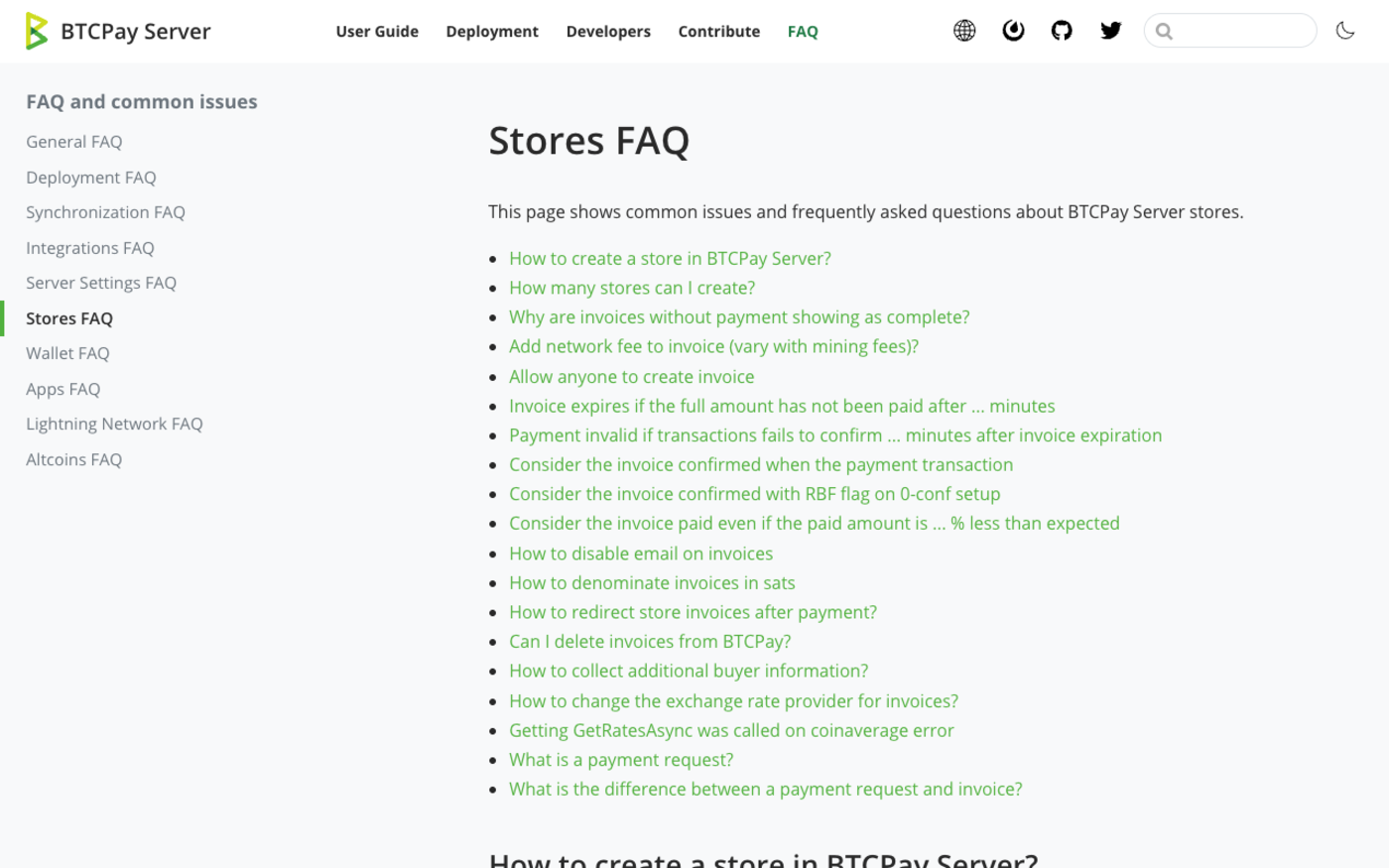
The arithmetic that catches people: a Bitcoin block arrives roughly every ten minutes on average, and a customer who broadcasts at minute 13 of a 15-minute window has almost no chance of confirming inside it. That is not a bug, it is the window being set for a fast chain and used on a slow one. BTCPay's store settings separate the two concepts precisely for this reason — the invoice timer governs how long the customer has to pay, and a separate setting governs how long after expiry an unconfirmed transaction has before the invoice is marked Invalid.
Two changes fix most expiry tickets. Lengthen the window on slow chains, or stop offering slow chains for small amounts — a $30 order does not need Bitcoin mainnet when the same customer can pay on Tron in three seconds. And treat Expired (paidLate) as a fulfilment queue rather than a dead end: the money is real, it just arrived after the bell. NOWPayments' own advice is to send a reminder on expiry, on the reasonable theory that most expired invoices are distraction, not abandonment.
Fix 4: it is still confirming, and that is correct
Some of these tickets are not problems. confirming means the transaction is broadcast but not final, and NOWPayments' instruction for that status is blunt: do nothing, the payment is not final yet. A transaction sitting in the mempool can still be replaced or dropped, which is exactly why the status exists.
How long "still confirming" should reasonably last is a function of the chain's block time multiplied by the confirmation depth your gateway requires. The depth is configurable at most gateways — BTCPay exposes it directly as the minimum confirmations after which an invoice becomes settled, and notes that Lightning payments go straight to settled — so the honest table is block cadence, not a fixed confirmation count:
| Network | Approx. block cadence | Realistic wait before you worry |
|---|---|---|
| Bitcoin | ~10 minutes per block | 30-60 min; longer if the fee was set too low |
| Bitcoin (Lightning) | Off-chain, near-instant | Seconds — BTCPay settles Lightning immediately |
| Ethereum | ~12 seconds per slot | 5-15 min at typical confirmation depths |
| Tron (USDT-TRC20) | ~3 seconds per block | 1-2 min |
| Polygon PoS | ~2 seconds per block | 1-3 min |
| Litecoin | ~2.5 minutes per block | 10-20 min |
Block cadence is a protocol property; the "wait before you worry" column is block time multiplied by the confirmation depths gateways commonly require, so check your own store's setting for the exact number.
NOWPayments' published triage for a stuck payment is to wait 10 to 15 minutes and refresh the status, then contact support if it is still unresolved after 30 minutes. That is a good default for any gateway: it is long enough to clear normal congestion and short enough that a genuinely lost payment does not sit unnoticed. The one genuine failure inside this bucket is an underpriced fee on Bitcoin, where a transaction can idle for hours; a block explorer will show it unconfirmed in the mempool, and the customer's wallet is the only place a replace-by-fee bump can be initiated.
Fix 5: the chain paid you, your webhook did not
If the gateway dashboard says finished and your store still says awaiting payment, the payment is fine and your integration is not. This is the highest-value section of this article because it is the one failure that scales: a broken webhook does not lose one order, it loses every order until someone notices.
NOWPayments states the contract plainly — the callback URL must be publicly accessible and must return a 200 OK HTTP status code as soon as you receive the data, and you must verify the HMAC signature header using SHA256 and your secret key. Four things break that contract in practice, and each leaves a different signature in the dashboard:
- The endpoint is not publicly reachable. It sits behind session auth, basic auth, a staging password, or a WAF rule that challenges non-browser traffic. The gateway sees a 401/403 and your logs show nothing because the request never reached your application.
- You return 200 too late, or not at all. Doing order fulfilment, email sending and inventory updates before responding means a slow dependency turns into a timeout. Acknowledge with 200 first, queue the work second.
- Signature validation rejects valid payloads. Almost always because the body was re-serialised by a framework before hashing. Hash the raw request body exactly as received, never a re-encoded object.
- No idempotency. Gateways retry. NOWPayments' guidance is to check for a duplicate payment ID before creating a new transaction — without that, retries either double-fulfil or throw a 500 that looks to the gateway like a permanent failure.
| Webhook failure mode | What the gateway dashboard shows | What your own logs show |
|---|---|---|
| Endpoint not publicly reachable | Callback attempt logged as 401/403, payment still finished |
Nothing — the request never reached your app |
| 200 returned too late | Callback timed out, then retried | Handler ran to completion, response sent after the deadline |
| Signature validation rejects the payload | Callback delivered, 200 returned |
invalid signature, order left untouched |
| No idempotency | Repeated callback attempts for one payment ID | Duplicate order rows, or a 500 on the retry |
Two habits make this class of bug diagnosable instead of mysterious. Log the full request body, the headers including the HMAC signature, timestamps and your own response codes — NOWPayments suggests retaining these for at least 30 days, and that log is the only artefact that settles an argument about whether a callback was ever sent. And build a reconciliation job that polls the gateway's payment-status endpoint for any order older than an hour that is still awaiting payment. Webhooks are a delivery optimisation; polling is the safety net, and every mature integration has both. The patterns are covered in more depth in our payment gateway integration API guide.
Fewer of these tickets in the first place
NOWPayments publishes explicit statuses for partial payments and wrong-asset deposits, HMAC-signed IPNs, and a status endpoint to reconcile against. 0.5% fee, 300+ coins, no KYC to start.
Get a NOWPayments API Key →Fix 6: overpayment, dust, and the network fee nobody mentioned
Overpayment is the gentler cousin of the underpayment problem and it still stalls orders. BTCPay Server tracks it explicitly as a substatus rather than folding it into a generic paid state: an invoice can be Processing (paidOver), Settled (paidOver) or Invalid (paidOver). If your fulfilment logic only matches on the primary status you will handle it fine; if it matches on an exact amount, you will not.
There is a subtler behaviour worth knowing before it generates a complaint. BTCPay can add a network cost to the invoice total to protect merchants against dust from partial payments, and that setting is optional but enabled by default, with three modes: apply it after the first payment only, on every payment, or never. The practical effect is that a customer who underpays and returns to top up sometimes sees a new total slightly higher than their shortfall. BTCPay's own documentation recommends communicating this clearly so it does not look like overcharging — good advice, and worth a line in your checkout copy if you run BTCPay.
Refunding an overpayment is its own decision. Sending back $0.40 of BTC on mainnet can cost more in fees than the refund is worth, which is why many merchants credit small overpayments to a store balance instead. Whichever you choose, write it into your terms — the dispute dynamics here are unlike cards, and we cover why in crypto chargebacks and payment disputes.
Fix 7: "received" is not "settled"
The last bucket is not a failure at all — it is a vocabulary problem that generates real tickets, usually from the finance side rather than the customer. Three distinct events get collapsed into the phrase "we got paid":
- Payment confirmed. The chain is final and the gateway marks the invoice
finished,paidorSettled. Deliver the goods here. - Balance credited. The funds are in your gateway account, minus the processing fee. This can lag the confirmation, and it is where auto-conversion to a stablecoin happens if you enabled it.
- Payout settled. The money has actually left the gateway for your wallet or bank. Payout schedules and minimum withdrawal thresholds live here, and a fiat-settling gateway adds a banking leg with ordinary SEPA or wire timing on top.
A merchant reconciling orders against invoice status will periodically "discover" missing money that was never missing — it was sitting in a gateway balance below the payout minimum. Reconcile against payout records, keep the gateway fee visible as its own line so your margin maths stays honest, and if the delta between confirmation and payout matters to your cash flow, that belongs in your gateway choice rather than your support process. Our gateway fee comparison lays out where each provider sits.
The 10-minute triage script
Hand this to whoever answers your support inbox. It resolves the large majority of "my crypto payment was not received" tickets without an engineer.
- Ask for the transaction hash. Not a screenshot — the hash. No hash usually means no send.
- Open it in the block explorer for the network the invoice specified. Not found there? Check the other chains for that ticker — you have a wrong-network case (Fix 2).
- Compare the amount received to the amount invoiced. Short? Underpayment (Fix 1). Over? Check for a
paidOver-style substatus (Fix 6). - Check the timestamp against the invoice window. Paid after expiry is a late payment, not a lost one (Fix 3).
- Check confirmations. Below your store's threshold, wait 10-15 minutes and refresh before escalating (Fix 4).
- Gateway says paid, store does not? Stop here and hand it to engineering with the payment ID — it is a webhook fault (Fix 5).
- Store says paid, money not in the bank? Check payout schedule and minimum threshold before raising anything (Fix 7).
The pattern worth noticing across all seven: only two of them (wrong network, low fee) are genuinely the customer's mistake, and only one is the gateway's. The rest are configuration and integration choices you control — tolerance percentages, invoice windows, chain selection, webhook handling and reconciliation. That is good news, because it means the fix is mostly a settings review and one afternoon of engineering rather than a change of provider. If you are still choosing, our best crypto payment gateways for 2026 ranks the providers whose documented status models make these cases easiest to handle.
Audit your tolerance and expiry settings today
Most missing-payment tickets trace back to two numbers nobody changed after signup. NOWPayments exposes both, plus HMAC-signed IPNs and a status endpoint to reconcile against.
Start with NOWPayments →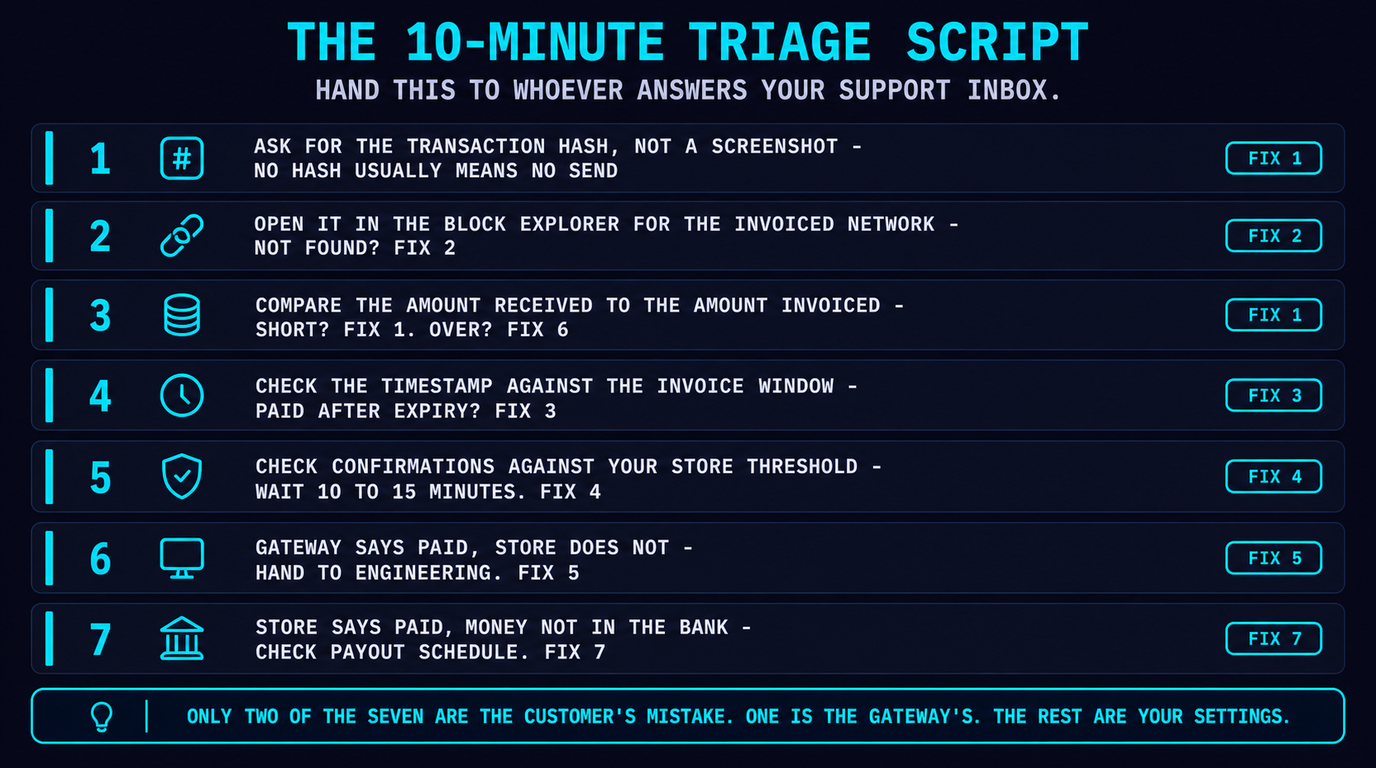
FAQ
My customer says they paid but the invoice still says unpaid. What now?
Ask for the transaction hash first, then paste it into the block explorer for that network. The hash tells you which of four things happened: nothing was sent, it went to a different address, it went on a different chain, or it is confirming normally. NOWPayments advises waiting 10-15 minutes and refreshing the status before escalating, and contacting support if it is still unresolved after 30 minutes.
What does partially_paid mean on a crypto invoice?
The funds arrived but the amount was smaller than the invoiced price, usually because the customer's wallet deducted the network fee from the send amount instead of adding it on top. NOWPayments documents it as a completed payment below the settled price and advises not delivering, with a dashboard button to mark it finished if you accept the shortfall.
A customer sent USDT on the wrong network. Can I recover it?
Sometimes, and it depends on who holds the key. If the deposit address was an EVM address and the funds landed on another EVM chain, the same private key controls it there, so a custodial gateway can often sweep it manually. If the address format is one the gateway never controlled on that chain, the funds are usually unrecoverable. Never promise recovery before the gateway confirms it in writing.
How long before a crypto invoice expires?
Shorter than most merchants expect. BTCPay Server defaults to a 15-minute invoice timer. CoinGate allows 2 hours to pick a currency and platform, then 20 minutes to send once chosen. Plisio lets you set the window yourself with an expire_min parameter. Tight windows exist to cap the merchant's exposure to price movement between quote and settlement.
The payment confirmed on-chain but my store never updated. Why?
Almost always a webhook fault on your side. NOWPayments requires the callback URL to be publicly accessible and to return 200 OK as soon as it receives the data, plus HMAC SHA-256 signature verification. The usual causes are an endpoint behind authentication, a WAF blocking the gateway, a signature check hashing a re-serialised body, and a handler that 500s because your own order lookup failed.
Should I deliver while the payment is still confirming?
No. Confirming means broadcast but not final, and NOWPayments' guidance for that status is to do nothing because the payment is not final yet. A mempool transaction can still be replaced or dropped. Deliver on settled or finished, and check the received amount against your expected price first.
Why did my invoice total go up after a partial payment?
BTCPay Server can add a network fee to the invoice total to protect against dust from partial payments. It is optional but enabled by default, applied after the first payment only, on every payment, or never. BTCPay recommends telling customers about it so the adjustment does not read as overcharging.
Does a received payment mean the money is in my bank account?
No. Payment confirmed, balance credited and payout settled are three separate events. A gateway can show a payment as finished while funds sit in your gateway balance under a payout schedule or minimum withdrawal threshold, and fiat-settling gateways add a banking leg on top. Reconcile against payout records, not invoice status.
Affiliate disclosure: payyd.co earns a commission when readers sign up for NOWPayments, Plisio or CoinGate through our /go/ links. We have no affiliate relationship with BTCPay Server and recommend it where it genuinely fits. All statuses, thresholds and time windows in this article were read from each provider's own published documentation in September 2026 and are subject to change — check your own store settings before relying on a number here. Gateway tiering reflects payyd's editorial criteria, not commission rates.